
WordPress booking plugin
The salon booking plugin for WordPress
Keep your WordPress website and add online booking with deposits, your services and prices and a chat assistant, run from Pulosa. Clients book without ever leaving your site.
14 days free on every plan. No card needed, no commission, no contract.
The short answer
Pulosa Booking is a free WordPress plugin that adds online booking to a salon or clinic website. Clients choose a treatment and a time, pay a deposit and book without leaving your site, and every booking goes straight into your Pulosa calendar with confirmations and reminders sent for you. Install it from WordPress.org (opens in a new tab), connect it with a one-time code and add the booking block to any page.
Checked by Adam Rance, founder of Pulosa
What you get with Pulosa
Booking inside your pages
In any page, or a Book now button that opens booking over the page.
Deposits paid to you
By card, into your own Stripe, Square or SumUp account.
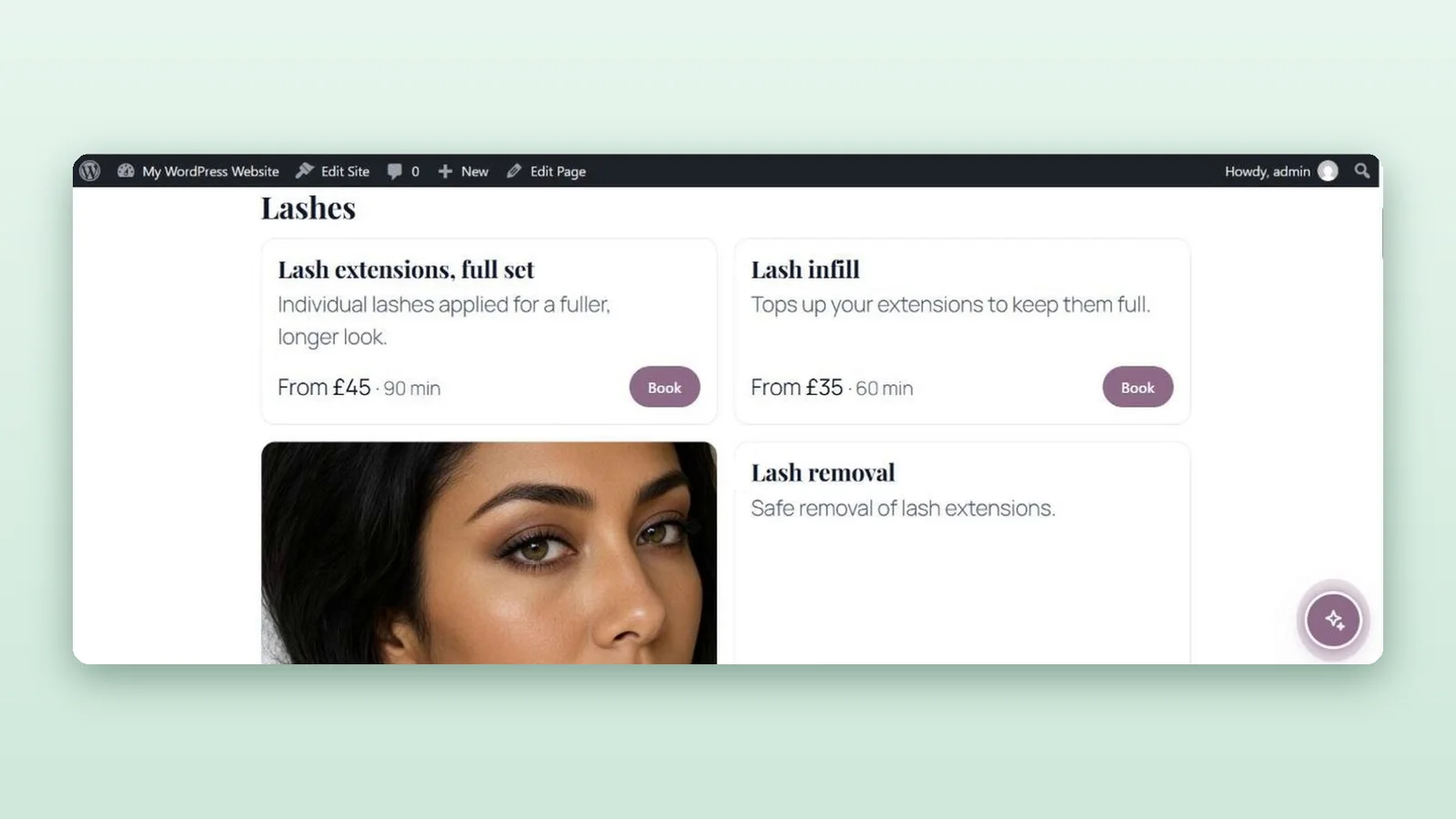
Services Google can read
Your treatments and prices as real page content, with a Book button on each.
Your look
Clean, Bold, Soft or Dark, your fonts and brand colour, with a live preview.
Works with your page builder
Blocks for the block editor, shortcodes for Elementor, Divi and others.
No client data in WordPress
Bookings, payments and client records stay in Pulosa.
Set it up in three steps
- 1Create your Pulosa account at pulosa.com and add your treatments, prices and team. Every plan has a 14-day free trial, no card needed.
- 2Install the plugin: in WordPress, go to Plugins → Add Plugin, search for “Pulosa Booking”, then Install Now and Activate. It’s free in the WordPress plugin directory (opens in a new tab).
- 3Connect with a one-time code from Pulosa (Admin → Website & messages → Integrations → WordPress), then add the Pulosa Booking block to any page. No passwords to type in.
Your Pulosa website needs to be live and online booking switched on for booking to show. Change a price or a treatment in Pulosa and your WordPress website shows it, with nothing to set up twice. The step-by-step guide covers every setting.
What your clients see
- Online booking in the page, or opening over it: they pick a treatment, a time and who with, and pay a deposit if you take one.
- Your services and prices as Cards with photos, a Price list or Categories, with offer labels like “20% off” and a search box for long menus.
- An optional chat assistant on every page that answers questions about your services, prices, opening hours and booking, and takes their details for you.
- Everything after booking from Pulosa: confirmations, email and text reminders, and consent and health forms to fill in before the appointment.
What you get in WordPress
Pulosa in the WordPress menu shows today’s website bookings, this month’s bookings and what they’re worth, unread enquiries, your next website bookings and any offers running today, with quick links into your Pulosa calendar, clients, services and messages. A dashboard widget shows your website bookings at a glance.
Look and style is saved in Pulosa, so your WordPress website and your Pulosa booking page always match. “Powered by Pulosa” is off unless you turn it on.
Plugin, embed code or a Pulosa website?
| Option | Best for |
|---|---|
| Pulosa Booking plugin | WordPress websites: blocks, shortcodes, your services as page content and styling from WordPress |
| Website code (embed) | Wix, Squarespace, Shopify, Webflow and other website builders |
| Your Pulosa booking website | No website yet: one is included on every plan |
Not sure which? Read can I add online booking to my existing website.
Light on your website, private by design
The booking script only loads on pages with booking, the chat script only if you switch the chat assistant on, and your services list is cached for up to 10 minutes. Bookings, payments and encrypted client records stay in Pulosa: WordPress only shows your website bookings (time, service and client name) to you, in the WordPress admin.
Prices
One monthly price per plan, in pounds. Unlimited clients and bookings, no commission, no set-up fee and no contract.
Lite
£24 a month
1 team member
For one person getting started: booking, deposits and consent forms.
Solo
£59 a month
Up to 2 team members
For one practitioner, with room for a helper on the desk.
Team
£129 a month
Up to 8 team members
For a busy business with a team sharing the diary.
Group
£249 a month
Up to 20 team members
For bigger teams, with up to 3 locations.
Questions people ask
Is the Pulosa Booking plugin free?
Yes. The plugin is free. It needs a Pulosa account, from £24 a month with no commission on bookings, and every plan has a 14-day free trial with no card needed.
Does it work with Elementor and Divi?
Yes. Use a Shortcode widget with [pulosa_booking] or [pulosa_services]. In the block editor, add the Pulosa Booking or Pulosa Services block.
Can clients pay a deposit when they book on my WordPress website?
Yes, if you take deposits in Pulosa. Clients pay by card on the secure payment page of your own Stripe, Square or SumUp account, and the money goes straight to you.
Will it slow my website down?
The booking script only loads on pages with booking, and the chat script only if you switch the chat assistant on. Your services list is cached for up to 10 minutes.
Are client details stored in WordPress?
No. Bookings, payments and client records stay in Pulosa. WordPress only shows the bookings made on your website (time, service and client name) on the plugin’s admin page and dashboard widget.
My website isn’t on WordPress. Can I still add booking?
Yes. Paste Pulosa’s website code into Wix, Squarespace, Shopify, Webflow or another builder, or use the booking website included with every plan.
Read next
Bookings, deposits and consent forms in one place
Try Pulosa free for 14 days. One monthly price, no commission, and no card needed to start.