
A salon website with booking built in
Pick a design made for your trade, and your services, prices, team and booking are already on it. Edit it on the page, then publish.
Included on every plan. Your own domain from Solo up; Lite uses a pulosa.com address.
In Pulosa
Hydrating facial
60SaveYour website
Hydrating facial
45 min · £60
Website, booking page and takings updated
A booking link isn’t a website
A link to a booking app shows clients a page full of other businesses, and it doesn’t tell Google much about you. A website made by a designer costs hundreds and still needs a booking system bolted on.
Pulosa builds the website from what’s already in your account: your services and prices, your team, your opening hours and your photos. Change a price in Pulosa and the website changes too.
How website builder works in Pulosa
- 1
Choose a design
Designs made for hair salons, barbers, beauty salons, nail studios, lash and brow studios, aesthetics clinics, wellness and more, each shown with your own name and services.
- 2
Make it yours
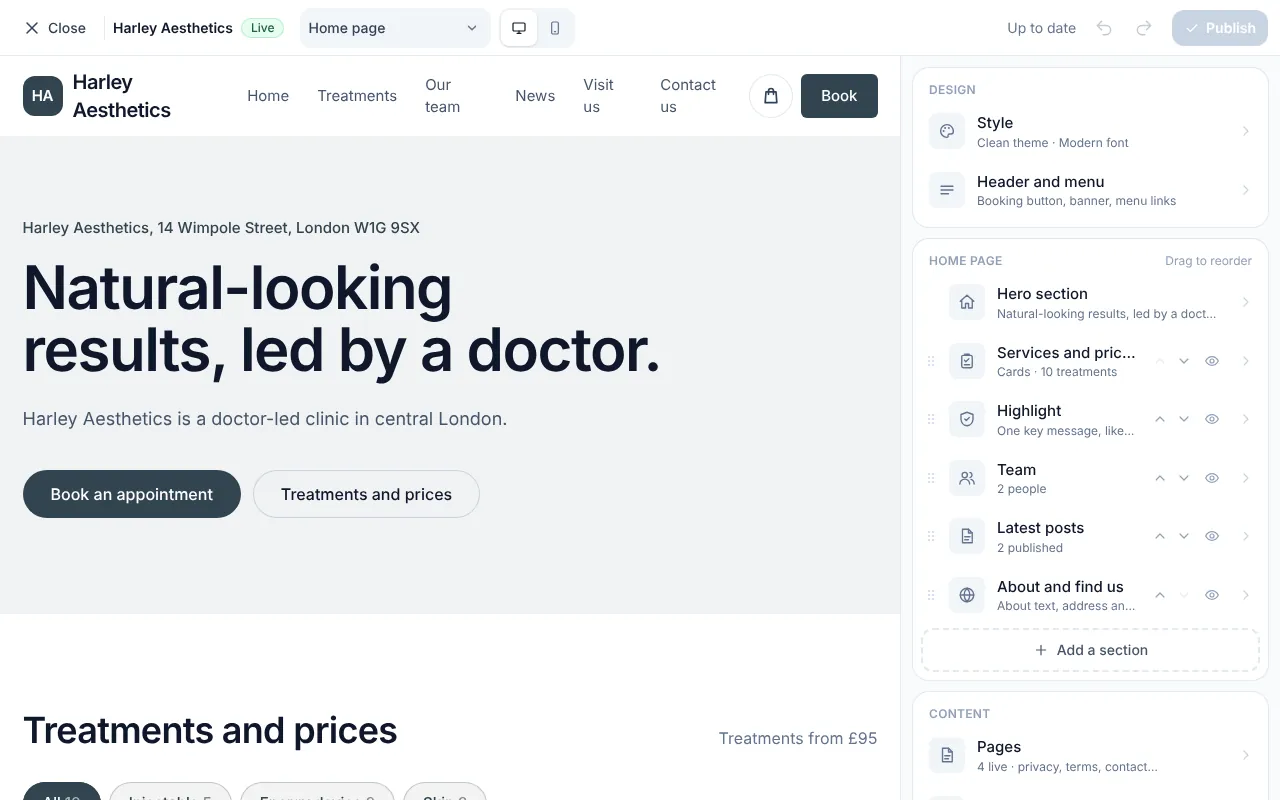
Theme, colours, font and logo, header photos or a video, and sections you add, hide and move: services, team, gallery, reviews, Instagram, news, and more.
- 3
Edit on the page
Click the words on your website to change them, with Write with AI on hand for headlines and descriptions.
- 4
Publish
Go live on a pulosa.com address, or on your own domain from Solo up.
See it in the app
The details that matter
Booking built in
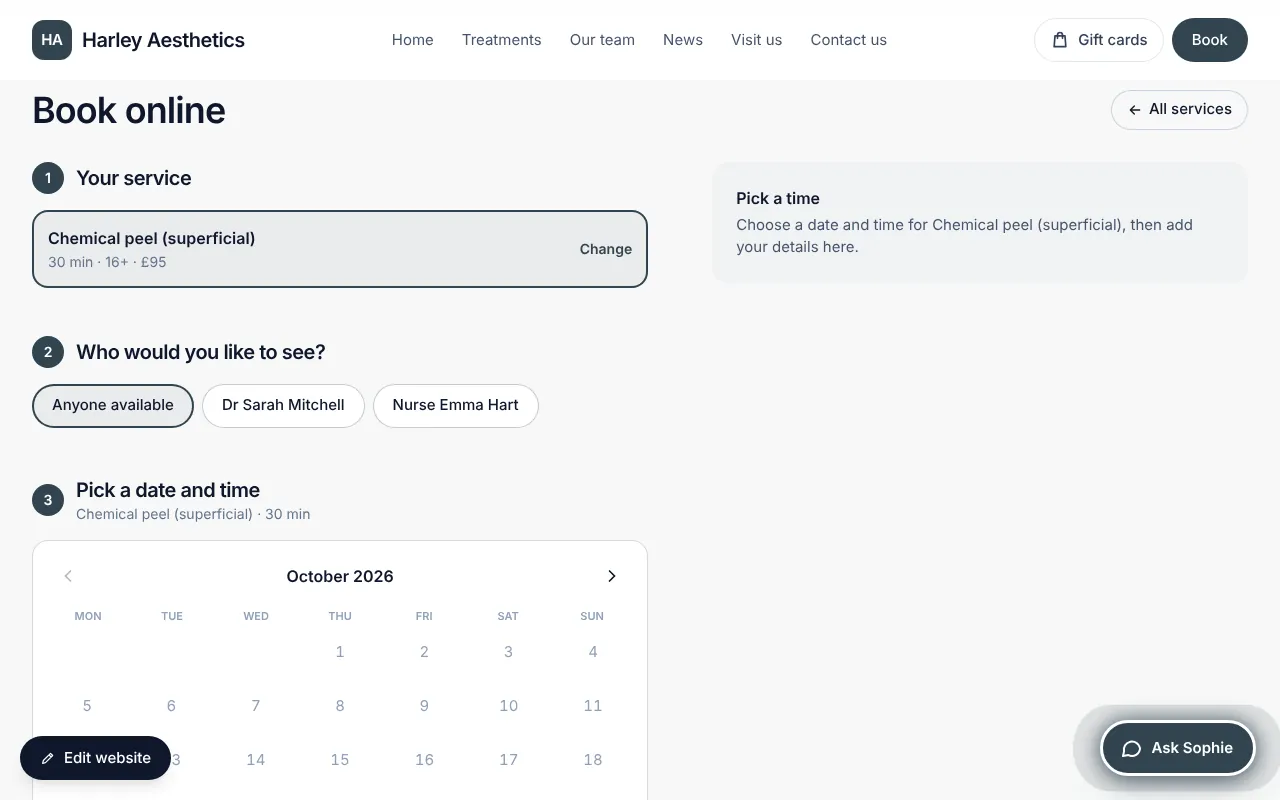
Clients choose a treatment, who they’d like to see and a time, pay a deposit if you take one, and fill in their forms, all on your website.
Found on Google
Each website has its own title, description and Google listing settings, plus a sitemap and the details Google reads about your business.
Pages and news
Add pages and news posts, and choose what goes in your menu.
Gift cards and a shop
Sell gift cards, and products with click and collect, from the same basket.
Your clients’ privacy
A Manage my data page lets clients see, update or ask to delete their details, and your privacy policy is written for you.
Widgets from other services
Paste embed code for things like review widgets, on any page.
Building a website that brings in bookings
Practical advice from working with salons, clinics and studios, whichever software you use.
- 1
Use your own photos
Real photos of your work, your room and your team build more trust than stock images. Use your best recent work in the header and gallery, and update them when your work moves on.
- 2
Describe each treatment properly
Clients search for things like ‘lash lift near me’ or ‘gel nails Bedford’. A clear name, what’s included, how long it takes and who it’s for helps both clients and Google understand what you offer.
- 3
Put your area in the words
Mention your town or area in your headline and about section. Local searches are how most clients find a salon, so tell Google where you are.
- 4
Keep it up to date
Prices, team and opening hours come from your Pulosa account, so they’re never out of date. Add a news post now and then about new treatments or offers.
- 5
Link it everywhere
Put your website and booking link in your Instagram bio, your Facebook page and your Google Business Profile, so every place people find you leads to the same booking page.
Questions about website builder
Do I need a website if I have Instagram?
Instagram is great for being found, but a website with booking turns that interest into appointments, works when Instagram changes, and helps you show up on Google. Put your website link in your Instagram bio.
Can I use my own domain name?
Yes, from the Solo plan up. On Lite, your website is on a pulosa.com address.
Do I need to know how to design websites?
No. Pick a design made for your trade and it fills in with your services, team and prices. Edit the words and photos on the page.
Will it work on phones?
Yes. Pulosa websites and booking are built for phones first, as that’s where most clients book.
Can I add booking to the website I already have?
Yes. Pulosa’s booking can go on Wix or Squarespace sites too, and WordPress websites have the free Pulosa Booking plugin: see Booking on another website in our help centre.
Which plans include a website?
Every plan includes a website with booking. Your own domain comes with Solo and up.
Can I move my existing website to Pulosa?
You can build a new Pulosa website with your words and photos, then point your domain at it from the Solo plan up. Or keep your current site and add Pulosa’s booking to it.
Can I sell products on my website?
Yes. Add products with stock levels, and clients buy them with click and collect from the same basket as gift cards.
Can I change my design later?
Yes. Choose another design whenever you like. Your services, prices and team come with you, because they come from your Pulosa account.
Can I add Google Analytics and Search Console?
Yes. Add your Google Analytics measurement ID and Search Console verification code in Website settings. Both are optional.
Try it free for 14 days
Everything in one monthly price, with no commission and no card needed to start.