
An AI receptionist that answers the calls you miss
When you’re with a client, it picks up in your business’s name, books from your real free times, moves and cancels appointments, and takes messages. Press play to hear a real call.
Included from Solo up: 60, 120 or 300 minutes a month depending on plan, with more available to buy.
Missed call, forwarded…
07700 900456 · ringing
You’re with a client.
The call comes to your receptionist.
New booking by phone
Sophie Walker · Hydrating Glow Facial
Thu 2:30pm with Amelia. Deposit link and consent form sent by text.
In your diaryEvery missed call is a booking somewhere else
You can’t answer the phone with a client in the chair, a needle in your hand or a towel on someone’s face. Most people who get voicemail don’t leave a message: they ring the next business on Google.
A receptionist costs a salary. Pulosa’s AI receptionist answers in your business’s name, knows your services, prices and opening hours, and works from your real diary, so it can book a client there and then instead of promising a call back.
How ai receptionist works in Pulosa
- 1
Choose your number
Pick a local number for your business on the Receptionist page. Your clients keep ringing your usual number.
- 2
Forward the calls you miss
Set your phone to forward calls you don’t answer to your Pulosa number. The page shows the codes for mobiles and most landlines. You always get the first chance to pick up.
- 3
Choose what it can do
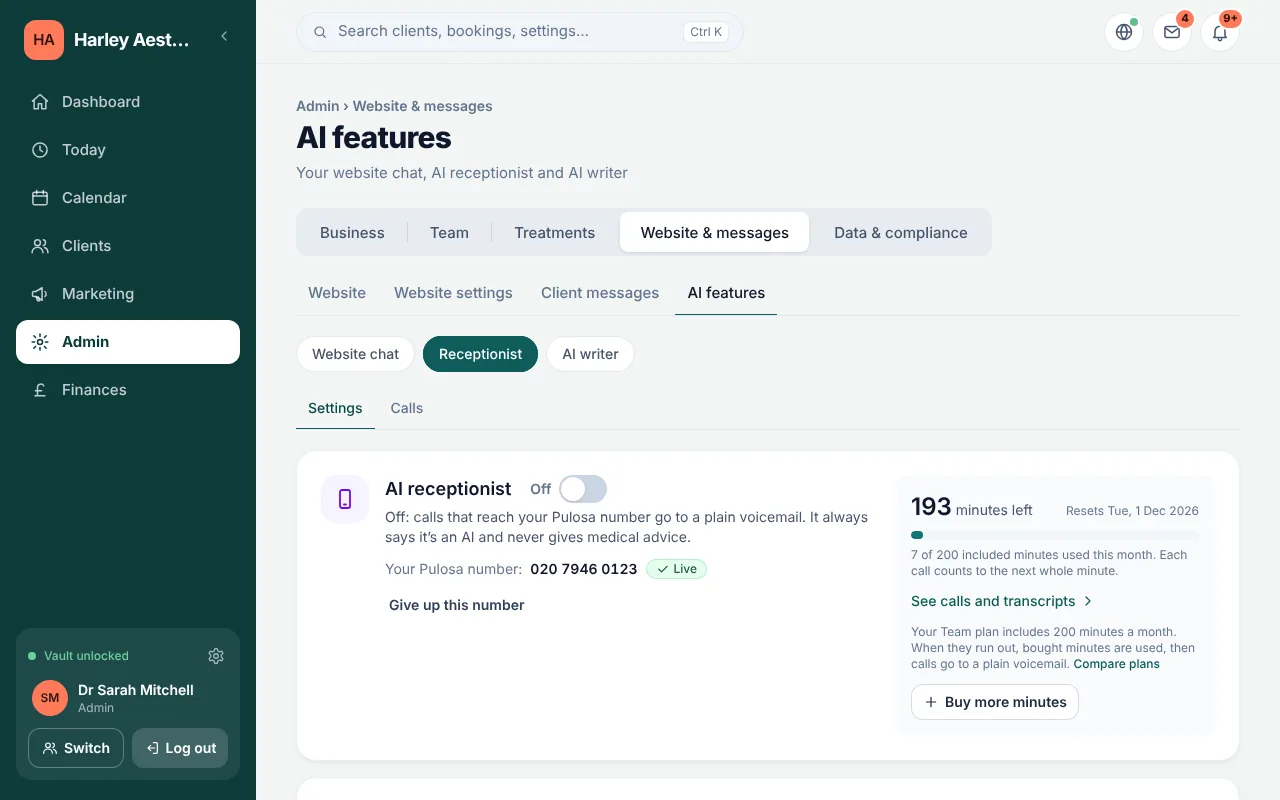
Give it a name and one of 14 British voices, write a greeting, and switch on what it may do: take messages, book, move and cancel appointments.
- 4
See every call
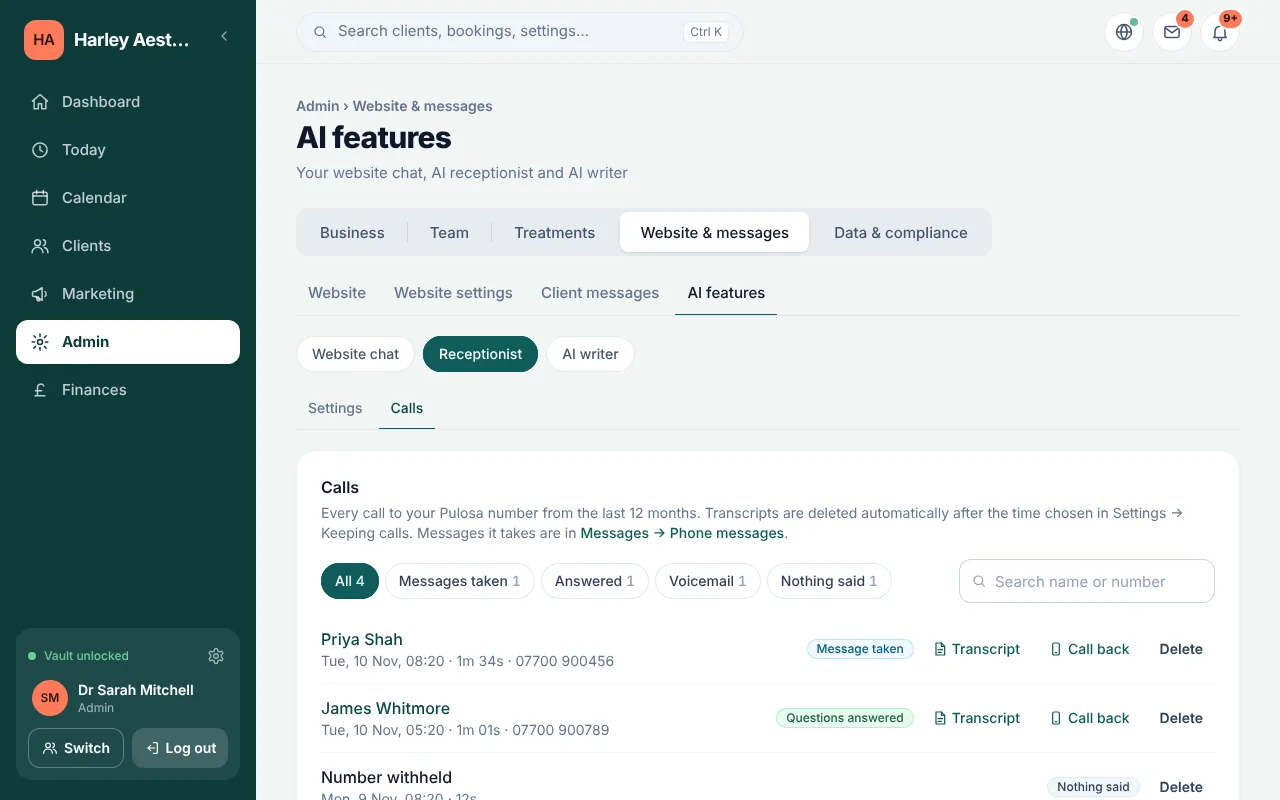
Messages arrive in Messages, urgent ones first, with the whole call written out. Tap Call back to ring the caller from your phone.
See it in the app
The details that matter
Books from your real diary
It offers times that are really free, with the right person, and checks your notice and booking rules. Bookings arrive like online ones, marked as booked by phone.
Honest about being an AI
It speaks naturally and doesn’t announce itself as an AI, but says so if a caller asks, and puts callers through to you when they ask for a person.
No medical advice, ever
Anything about a reaction, pain or swelling becomes an urgent message for your team. It never tells a caller what to do about their health.
Answers when you choose
Only the calls you miss, only when you’re closed, set hours, or every call. Add days you’re closed and it answers everything on those days.
Knows your business
It answers from your services, prices, opening hours, team and address, plus answers you write yourself for the questions you get most.
Fair on minutes
Calls under 15 seconds (hang-ups, wrong numbers) don’t count. When your minutes run out, calls go to a plain voicemail, and you can buy more.
Getting the most from your AI receptionist
Practical advice from working with salons, clinics and studios, whichever software you use.
- 1
Write answers to your top ten questions
Think about what people ring to ask: parking, how long a treatment takes, whether you do a consultation first, what to do before an appointment. Add these under Your answers in your own words, so callers get the same reply you’d give.
- 2
Keep your service descriptions honest and specific
The receptionist answers from your services, prices and descriptions. If a treatment needs a consultation, a patch test or a deposit, say so in the description, and it can tell callers before they book.
- 3
Choose when it answers
Most businesses start with calls you miss, so you still get the first chance to pick up. If you’re fully booked with clients most days, switching to every call during treatment hours stops the phone interrupting you.
- 4
Call back the messages it takes
A message taken is a client still deciding. Messages arrive with the whole call written out, so you can see what they wanted before you ring, and Call back rings them from your own phone.
- 5
Ring it yourself first
Before you forward your real calls, phone your Pulosa number and try booking, moving and cancelling. You’ll hear exactly what clients hear, and can adjust the greeting and answers until it sounds like your business.
Questions about ai receptionist
Will callers know it’s an AI?
It speaks naturally in your business’s name and doesn’t announce itself as an AI, but if a caller asks, it says so honestly. Callers who want a person are put through to you.
Do I need a new phone number?
No. Your clients keep ringing your usual number. You forward the calls you miss to your Pulosa number, which is included in your plan.
Can it book appointments?
Yes, if you switch it on. It books from your real free times with the right person, and can move and cancel appointments too. Bookings arrive in your calendar marked as booked by phone.
What happens when my minutes run out?
Calls go to a plain voicemail. Anyone with the Billing permission can buy more minutes; bought minutes last 12 months and are used once the month’s have gone.
Which plans include it?
Solo includes 60 minutes a month, Team 120 and Group 300. It isn’t on the Lite plan.
What does it do with medical questions?
It never gives medical advice. Anything about a reaction, pain or swelling becomes an urgent message for your team to call back.
Can I choose its voice and name?
Yes. Give it any name and choose one of 14 British voices, female or male, and press play to hear each one before you pick.
Does it work with my landline?
Yes. Most UK landlines can forward calls you don’t answer to another number. The Receptionist page shows the usual codes for BT, Sky and Virgin Media; some providers use other codes or charge for forwarding, so check with yours.
Try it free for 14 days
Everything in one monthly price, with no commission and no card needed to start.