
Deposits and no-show fees that run themselves
Clients pay a deposit or the full price when they book, agree to your policy, and get refunded automatically if they cancel in time. Late or no-show, your policy decides what you keep.
Included on every plan, with your own Stripe, Square or SumUp account.
Hydrating facial · Thursday 23 October
An empty slot costs you twice
A no-show isn’t just the price of the treatment. It’s the time you kept free, the client you turned away, and the awkward message afterwards asking for a fee you never agreed in writing.
A deposit taken at booking, with a clear policy the client agreed to, changes that. Most clients who have paid something turn up, and those who don’t have already covered part of the cost.
How deposits and no-show fees works in Pulosa
- 1
Connect card payments
Connect your own Stripe, Square or SumUp account. The money goes straight to you.
- 2
Choose when clients pay
In full when they book, a deposit from 5% to 100% of the price, or on the day.
- 3
Set your booking policy
Free cancellation up to 12, 24, 48 or 72 hours before; what a late cancellation and a no-show cost (keep what they paid, or up to 100%); and whether repeat no-shows must pay in full next time.
- 4
Let it run
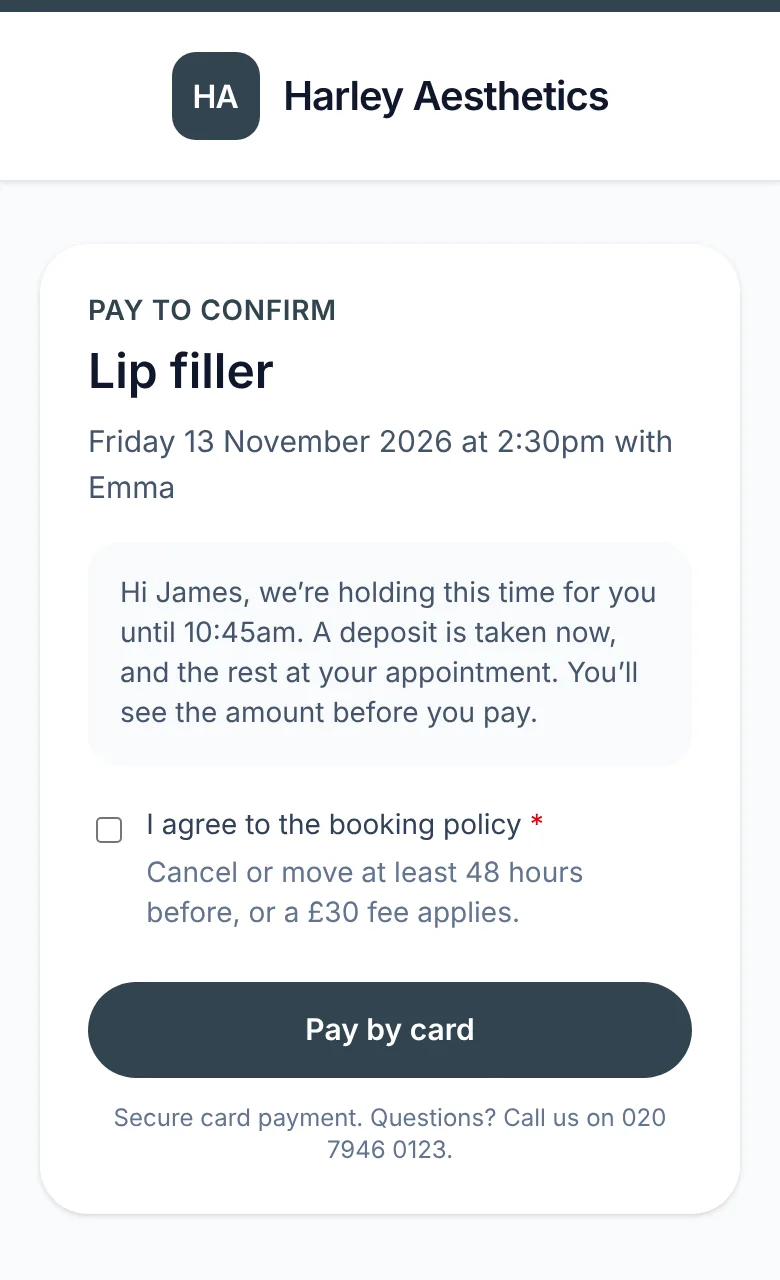
Clients tick to agree before paying. Cancel in time from their link and they’re refunded automatically. Late or no-show, the booking offers your fee.
See it in the app
The details that matter
The policy they agreed to, kept
A copy of your policy as it was, and when the client ticked to agree, is kept with the booking.
Refunds without lifting a finger
Clients who cancel in time from their link get back what they paid online by card straight away, even when nobody has Pulosa open.
Fees charged the easy way
Charge the card they saved when booking online (with Stripe), send a payment link, or take it at the desk. Never more than your policy allows.
Repeat offenders pay up front
After 1, 2 or 3 no-shows or late cancellations, a client pays in full when booking online. You can override it on their page.
Late and no-show at a glance
Someone 15 minutes late shows as Late with a No-show button, which stops their reminders and offers your fee.
Reminders that cut no-shows
Text and email reminders, each with a link to change or cancel, so clients who can’t come tell you in time.
Setting a deposit policy clients accept
Practical advice from working with salons, clinics and studios, whichever software you use.
- 1
Match the deposit to the appointment
A short, low-priced appointment might not need a deposit at all, while a long set or an expensive treatment usually does. Many businesses take a bigger deposit, or full payment, for their longest and most valuable appointments.
- 2
Make the policy short and plain
Clients are far more likely to accept a policy they can read in ten seconds: how much notice they need to give, what happens if they cancel late, and what happens if they don’t turn up. Pulosa writes it from your settings, and you can reword it.
- 3
Be consistent
A policy only works if it’s applied the same way to everyone. Pulosa takes the deposit and applies your policy automatically, so you’re not deciding case by case or having awkward conversations.
- 4
Use reminders as well as deposits
Deposits make clients think twice about missing an appointment, and reminders stop them forgetting. Together, with a link to change or cancel, they give people every chance to tell you in time.
- 5
Be fair when life happens
You can always choose not to charge, or charge less than your policy allows. A good policy protects your time without punishing a regular client who has a genuine emergency.
Questions about deposits and no-show fees
Can I charge a no-show fee in the UK?
Businesses commonly charge fees set out in a cancellation policy the client agreed to in advance. Keep the fee fair and proportionate to your real loss, and make the policy clear before they book. Our free cancellation policy generator helps you write one.
How big should a deposit be?
It’s your choice: Pulosa lets you take anything from 5% to 100%. Many businesses take more for long or expensive appointments. Our no-show calculator shows what different deposits would win back.
Do clients get refunded automatically?
Yes. If they cancel before your free cancellation time from their link, what they paid online by card is refunded straight away and they’re emailed to say so.
Can I charge the card they used to book?
With Stripe and a fee set, the card is saved securely by Stripe when they book, so you can charge your late or no-show fee to it. With Square or SumUp, send a payment link or take it at the desk.
Does Pulosa take a cut of deposits?
Square and SumUp payments carry no Pulosa fee. For Stripe, any Pulosa fee is shown on the Payments page before you connect. Your card provider’s own fees apply as usual.
Which plans include it?
Every plan, including Lite.
Can clients pay the rest at the appointment?
Yes. With a deposit, the rest is paid at the appointment by card, cash or gift card, and Pulosa shows what’s already been paid.
What if a client disputes a no-show fee?
Pulosa keeps a copy of the policy they agreed to and when they ticked to agree, with the booking. That gives you a clear record if you need it.
Try it free for 14 days
Everything in one monthly price, with no commission and no card needed to start.