
Consent forms signed before they arrive
Health questions, risks and signatures done on the client’s phone before the appointment, then countersigned and sealed so they can’t be changed.
Included on every plan, Lite to Group.
Paper forms fail when you need them most
A clipboard at the start of the appointment means rushed answers, missed questions and a form you can’t find a year later if a client makes a complaint. It also eats into the time you’ve booked for the treatment.
Pulosa sends the form before the visit. Clients answer honestly at home, you see anything that needs a look before they arrive, and the signed form is sealed and stored on their record.
How online consent forms works in Pulosa
- 1
Set up each treatment’s form
Each treatment has its own health questions, risks, aftercare and consent statement. Start from the standard form and change what you need.
- 2
Clients fill it in before the visit
Clients who book online complete it while booking. For bookings made by phone or at the desk, Pulosa can email the form automatically, from as soon as it’s booked to a week before.
- 3
You review and countersign
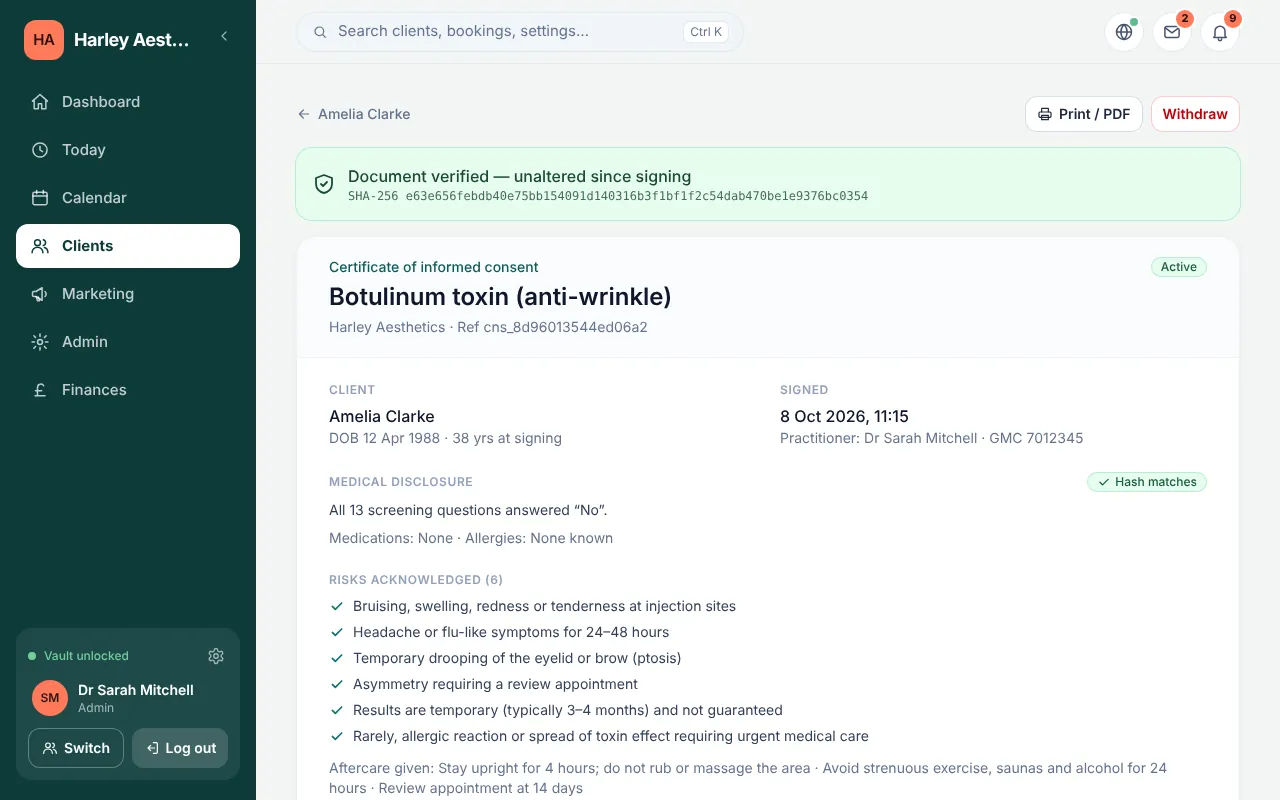
At the appointment, go through the answers together, change anything that’s different now, and countersign. Your registration number is added.
- 4
It’s sealed
Sealing fingerprints the form so it can’t be changed. A certificate shows it’s unaltered, and you can print it or save it as a PDF.
See it in the app
The details that matter
Answers that need a look are flagged
Choose what a “yes” means for each question: fine, caution or stop. A stop needs a written clinical reason to go ahead, kept in the audit log.
Encrypted before it’s sent
Forms filled in online are encrypted in the client’s own browser, so only people with permission to see clinical records can read the answers.
Only when a new one is needed
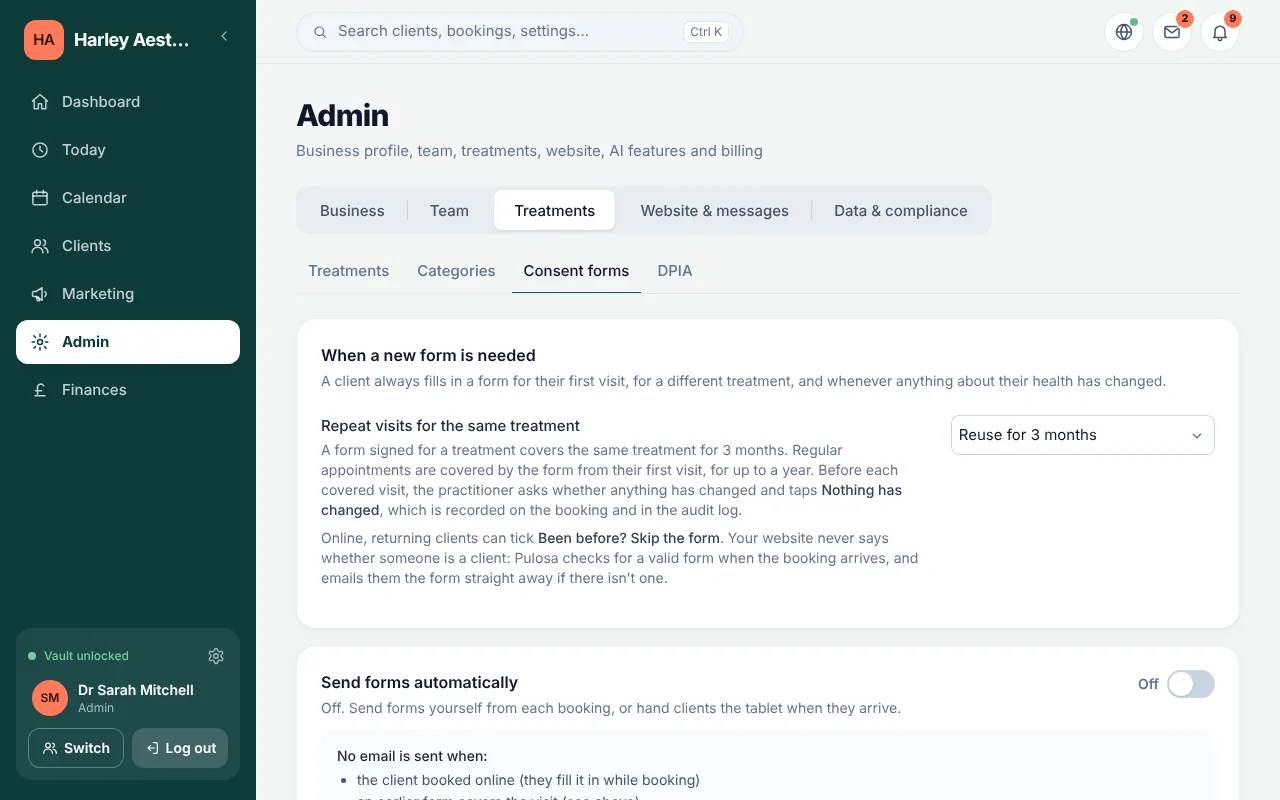
Ask for a form every visit, or reuse one for 1, 3, 6 or 12 months for the same treatment. No form ever covers more than 12 months.
In person too
Hand your tablet to the client: the screen locks to just their questions and signature, and a team member’s PIN unlocks it afterwards.
Withdrawing consent
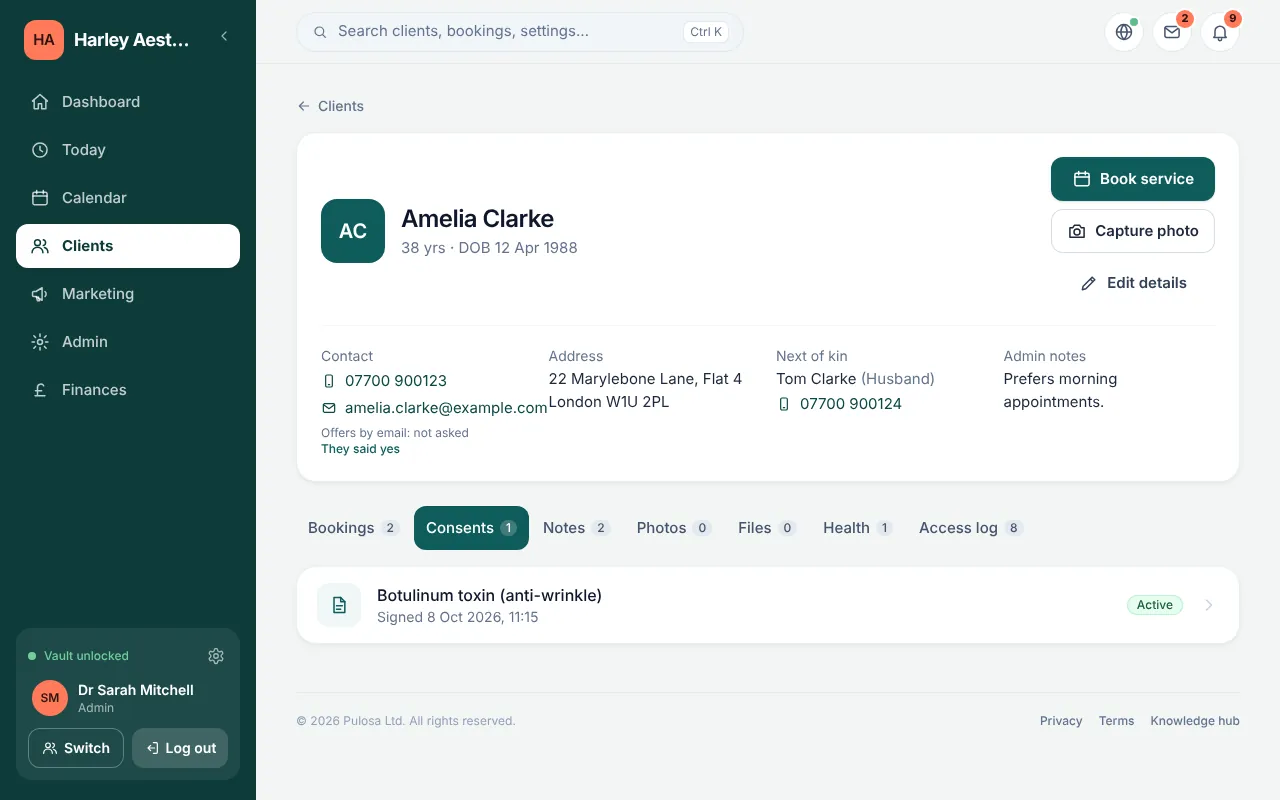
If a client withdraws, the original stays on file marked Withdrawn, and their next booking needs a new form.
Photo consent
Clients choose whether they agree to photos as part of the form, so you know before you take any.
Making your consent process work for you
Practical advice from working with salons, clinics and studios, whichever software you use.
- 1
Tailor the questions to each treatment
A lash lift and a dermal filler carry different risks. Edit each treatment’s health questions, risks and aftercare, rather than using one long form for everything, so clients only answer what matters for what they’re having.
- 2
Decide what a “yes” means
Mark each question as fine, caution or stop. A stop means a written clinical reason is needed to go ahead, which protects you if you ever need to show why you treated someone.
- 3
Send forms early
For bookings made by phone or at the desk, send the form when the booking is made or a few days before, with a reminder if it isn’t done. Clients answer more carefully at home than in your waiting area.
- 4
Go through it together anyway
A form signed online is a starting point, not a replacement for talking. At the appointment, read through the answers with the client, update anything that’s changed, and then countersign.
- 5
Check your insurer’s rules
Insurers and professional bodies have their own expectations about consent, records and how long you keep them. Set how long a form lasts and how long records are kept to match what yours asks for.
Made for your trade
Questions about online consent forms
Are online consent forms legally valid in the UK?
Electronic signatures are generally accepted in the UK. What matters most is that the client understood the risks and agreed. Check what your insurer and professional body expect for your treatments.
Can clients sign on their phone?
Yes. Clients who book online fill in the form while booking, and others get a link by email (or one you text them) that works on any phone.
Do I need a new form every visit?
You choose: every visit, or reuse a form for 1, 3, 6 or 12 months for the same treatment. Covered visits need you to confirm nothing has changed, which is logged.
Can a signed form be changed afterwards?
No. Once sealed it can’t be changed. Corrections are added as a sealed, dated note beside the original.
Who can read the health answers?
Only Admins and people with the See clinical records permission. Everyone else sees that a form was completed and who signed it.
Is there a free consent form template?
Yes. Our free consent form generator makes printable forms for anti-wrinkle, filler, lashes, brows, laser, peels, microneedling and tattoos.
What happens if a client answers yes to a health question?
It depends on how you’ve set that question: fine carries on, caution flags it for you, and stop needs a written clinical reason before you can go ahead. Anything flagged is shown when you review the form.
Can I use my own consent form wording?
Yes. Change the health questions, risks, aftercare and the consent statement for each treatment, or start from the standard form and edit it.
Try it free for 14 days
Everything in one monthly price, with no commission and no card needed to start.