
Card payments with Stripe, Square or SumUp
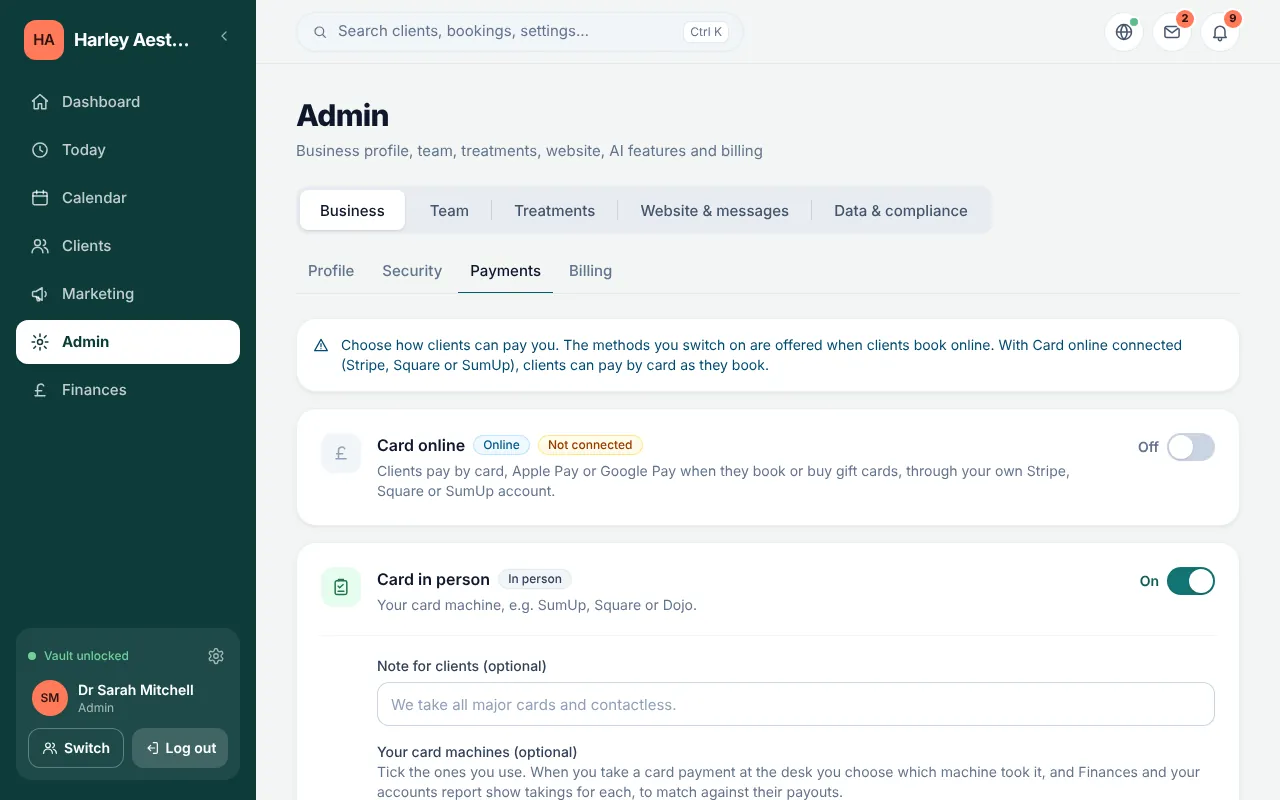
Use the card provider you already have. Clients pay online when they book, and at the desk on your Stripe reader, Square Terminal or SumUp Solo. The money goes straight to you.
Included on every plan. Your card provider’s own fees apply.
Taken£0
Costs£0
For tax£0
Your money shouldn’t be locked into one app
Many booking apps make you take payments through them, at their rates, into their account first. Switch app and you switch card readers too.
Pulosa works with Stripe, Square and SumUp. Connect the account you already have, keep your card readers, and the money goes straight into your own account.
How card payments works in Pulosa
- 1
Connect your provider
Choose Stripe, Square or SumUp for online payments and connect your account. Stripe takes about five minutes to set up if you’re new to it.
- 2
Choose when clients pay
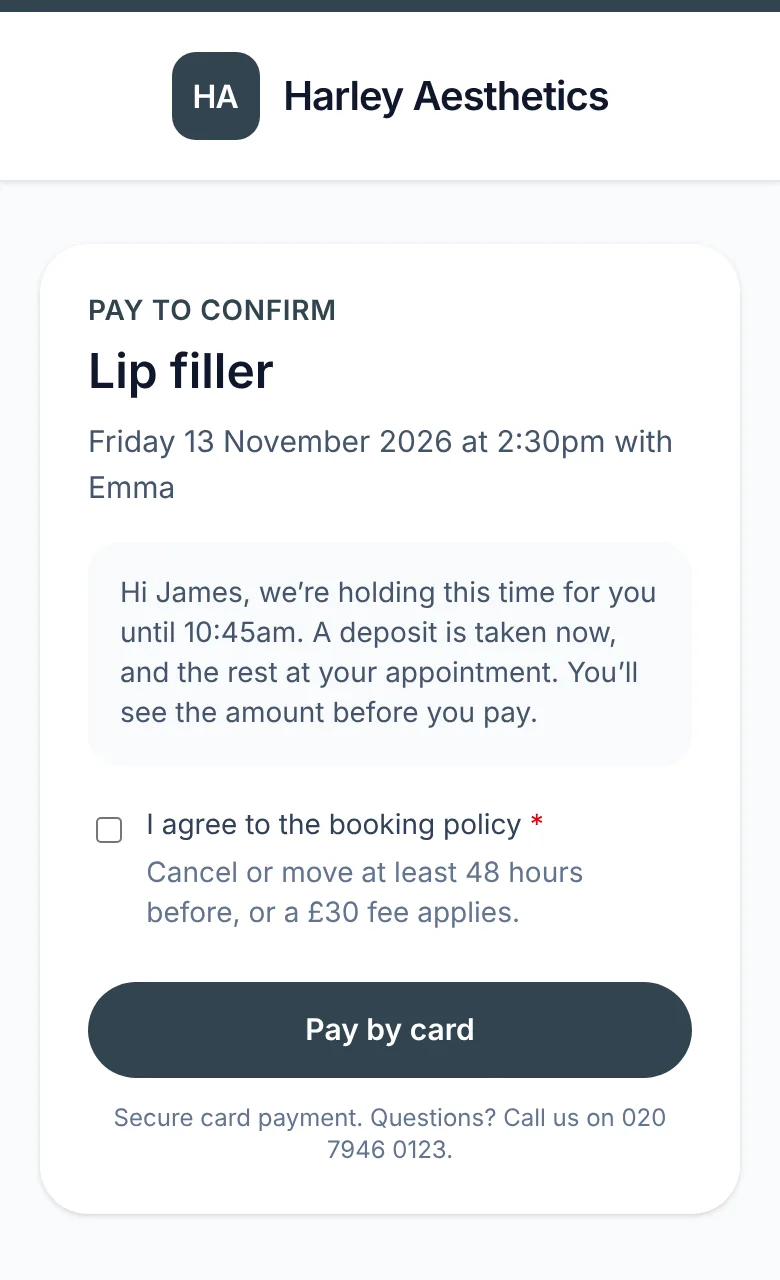
In full or a deposit when they book online, or on the day.
- 3
Pair your card reader
Pair a Stripe reader, Square Terminal or SumUp Solo, and send the amount to it from the booking. It’s marked paid by itself.
- 4
See it all in Finances
Every payment, which machine took it, refunds and fees, ready to match against your provider’s payouts.
See it in the app
The details that matter
Apple Pay and Google Pay
Clients pay on your provider’s secure payment page with cards, Apple Pay and Google Pay. With Stripe you can also switch on PayPal or Klarna.
Other card machines too
Use a Dojo or another card machine at the desk and record which one took the payment.
Cash and bank transfer
Take cash and bank transfer at the desk, with your bank details and a reference for clients.
Refunds from the booking
Refund online payments from the booking, so your calendar and Finances stay right. Refunds under your booking policy happen by themselves.
Receipts and invoices
Clients are emailed a receipt or invoice when you record a payment.
No marketplace cut
Pulosa has no marketplace and takes no commission on your bookings. Square and SumUp payments carry no Pulosa fee.
Choosing how to take payments
Practical advice from working with salons, clinics and studios, whichever software you use.
- 1
Use the provider you already have
If you already use Square or SumUp at the desk, connect the same account so everything is in one place. If you’re starting from scratch, Stripe is quick to set up and works with its own card readers.
- 2
Compare the card fees
Each provider charges its own fees, which change from time to time. Check the current rates on their websites for online and in-person payments before you choose.
- 3
Take payment when they book
Payment at booking, in full or as a deposit, cuts no-shows and means less money to chase. Card at the appointment, cash and bank transfer are still there at the desk.
- 4
Match your payouts
Finances shows which card machine took each payment, so you can match your takings against each provider’s payouts quickly.
- 5
Refund from the booking
Always refund from the booking in Pulosa rather than in your provider’s dashboard, so your calendar and Finances stay in step.
Questions about card payments
Can I use my existing Square or SumUp account?
Yes. Connect it in Pulosa, pair your Square Terminal or SumUp Solo, and keep using them. Payments go straight to your own account.
Does Pulosa charge a fee on card payments?
Square and SumUp payments carry no Pulosa fee. For Stripe, any Pulosa fee is shown on the Payments page before you connect. Your provider’s own card fees apply as usual.
Can clients pay with Apple Pay?
Yes. Clients pay on your provider’s secure payment page, which offers cards, Apple Pay and Google Pay.
Which card readers work with Pulosa?
Stripe readers, Square Terminal and SumUp Solo can take payments sent from a booking. You can also record payments from any other card machine, like Dojo.
Can I take PayPal or Klarna?
With Stripe, switch PayPal or Klarna on in your Stripe dashboard and they show on the payment page beside cards.
Which plans include card payments?
Every plan, including Lite.
Can I use more than one card machine?
Yes. Tick each card machine you use, and Pulosa records which one took each payment.
Do clients need an account to pay?
No. Clients pay on your provider’s secure payment page with a card, Apple Pay or Google Pay, without creating an account.
Can I take deposits with Square or SumUp, not just Stripe?
Yes. Deposits, full payment when booking and gift cards work with whichever of Stripe, Square or SumUp you choose to take card payments online.
When do I get the money?
Payments go to your own Stripe, Square or SumUp account and are paid out to your bank on that provider’s normal schedule. You’ll find your payout times in their dashboard.
Can I switch card provider later?
Yes. Choose a different provider under Take card payments online with, in Admin → Business → Payments, and connect that account. Payments you’ve already taken stay in Finances.
Try it free for 14 days
Everything in one monthly price, with no commission and no card needed to start.